Launch without a production queue
Create and update product visuals without scheduling a new video edit for every UI change.
Solutions · Product marketing
Use interactive demos to connect the message on the page to a real product workflow. DemoFast helps product marketers build launch, campaign, and evergreen product stories without waiting on video production or engineering.
Overview
Product marketing is responsible for clarity across many channels, but the product itself is often reduced to a screenshot or a generic overview video. That gap makes it harder for buyers to connect a claim to the workflow that creates the value.
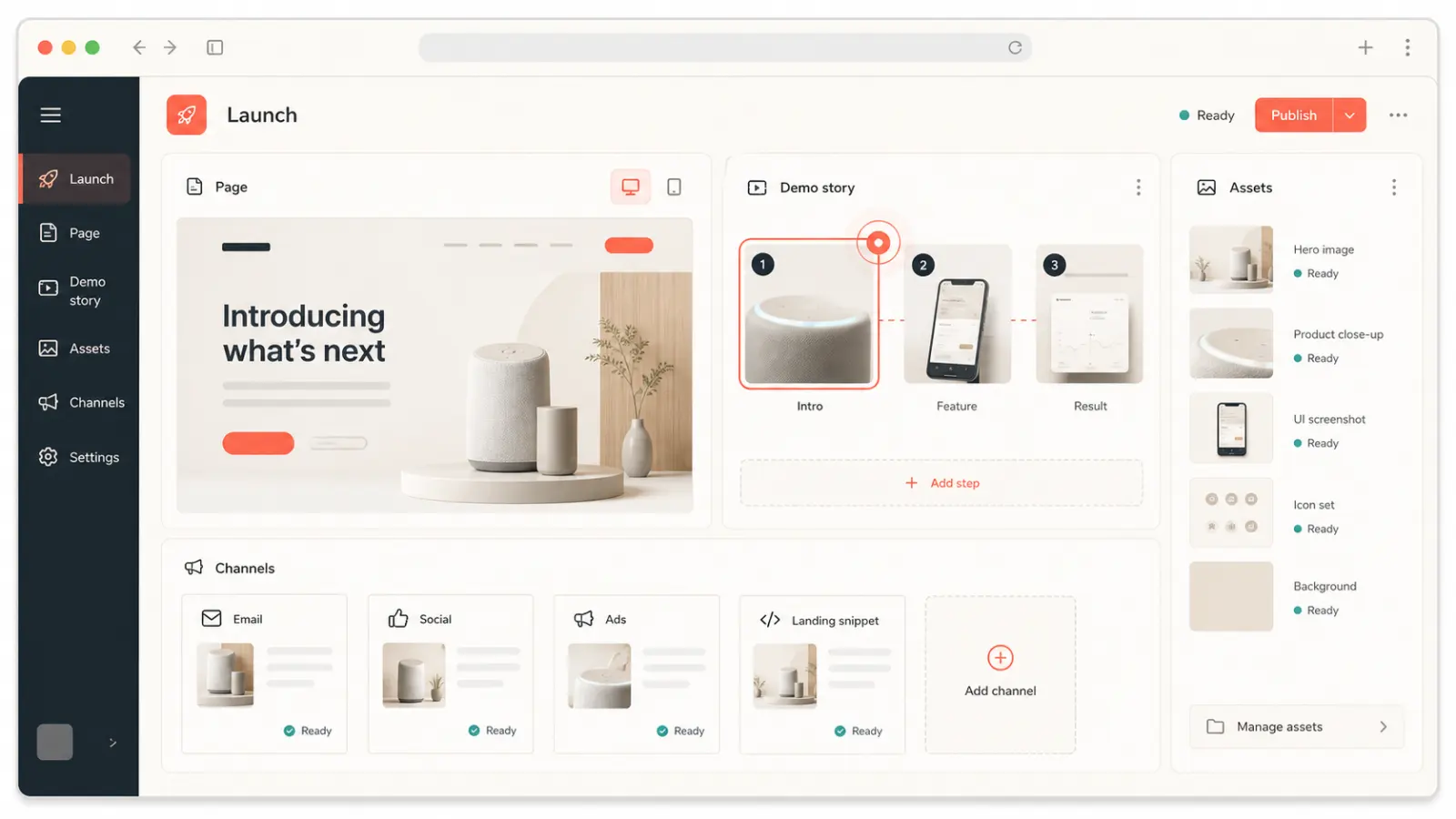
DemoFast gives product marketers an editable layer between the page and the live application. Capture a real product path, add the framing that matches a segment or use case, and distribute the experience as an embed, share link, GIF, or video. One source story can support a launch page, sales kit, blog post, and customer announcement.
Why it matters
Create and update product visuals without scheduling a new video edit for every UI change.
Place the exact workflow beside the value proposition it supports.
Give sales, customer success, and partners a shared product story with channel-ready outputs.
Product preview
The video runtime loads only after you choose to play, keeping the initial page light.

Practical fit
Show what changed, who it helps, and the shortest path to the new outcome.
Turn use-case positioning into a focused product flow instead of a broad dashboard tour.
Create persona or industry walkthroughs that match the promise in ads, email, and outbound.
Demonstrate a workflow advantage directly and keep claims specific to visible product behavior.
How it works
Define the audience, problem, product moment, and next action before recording screens.
Capture the relevant workflow and annotate the result with concise customer language.
Embed or share the asset, then review engagement to refine the story and placement.
Publishing checklist
Publishing is the beginning of the asset’s working life. Use this checklist to keep the product story focused, accessible, fast, measurable, and maintainable everywhere it appears.
Define who should use this interactive demos for product marketing experience, the product moment they need to understand, and the one action that should follow. Remove any step that does not advance that job.
Tell viewers what they will learn before asking them to click. The first screen should establish relevance quickly and show enough of the product to earn the next interaction.
Explain audience fit, use cases, tradeoffs, and next steps in accessible HTML around the demo. The page must remain understandable when a player cannot load or a visitor uses assistive technology.
Reserve explicit player dimensions, serve an optimized WebP preview, and initialize interactive or video code only after a click or near-viewport signal. Do not make every embedded asset compete with LCP.
Assign responsibility for product accuracy, links, analytics, and republishing. Review important commercial demos after major UI changes and on a regular content-maintenance cadence.
Measurement plan
A interactive demos for product marketing asset should have a specific job in the customer journey. Record its audience, traffic source, intended product moment, and next action before publishing. That context prevents raw view counts from being mistaken for progress and makes later edits easier to prioritize.
Track whether viewers advance to the screen where the promised value becomes clear. A high start rate with early abandonment usually signals a mismatch between the page promise, opening screen, or amount of guidance.
Measure completion by audience and placement, then review the specific step where people leave. Compare meaningful cohorts rather than combining homepage visitors, sales prospects, customers, and internal reviewers into one average.
Connect the demo to one proportionate next step—start free, request a deeper demo, reply to a rep, read implementation guidance, or try the workflow. Review quality and downstream outcomes alongside clicks.
Decision guide
A useful product-marketing demo should answer one buyer question well. If it tries to explain the whole platform, each step competes with the next and the CTA arrives after attention has already faded. Build modular demos around distinct use cases and connect them through a hub when the portfolio is broad.
Keep the surrounding page substantial. The demo proves the interaction, while the HTML page explains audience fit, tradeoffs, implementation, evidence, and next steps. Together they are more useful to buyers and more understandable to search engines than either asset alone.
Questions
Common assets include launch demos, website tours, solution walkthroughs, campaign-specific flows, sales enablement content, and customer education.
Yes. Publish it as an interactive link or embed and export it for channels that require GIF or WebM video.
Use the shortest sequence that reaches one meaningful product outcome. Split broader stories into separate flows rather than forcing every feature into one tour.
DemoFast’s capture and editor workflow is designed to let go-to-market teams create and update walkthroughs without code.
Continue exploring