Examples · Product launch demos
Introduce an AI rewrite feature through the product
A launch walkthrough that starts with a real editing task, reveals the new action, and compares the result before asking for adoption.
Interactive walkthrough
Illustrative exampleUse the Previous and Next buttons, activate the hotspot, or press the left and right arrow keys to move through this three-step illustrative example.
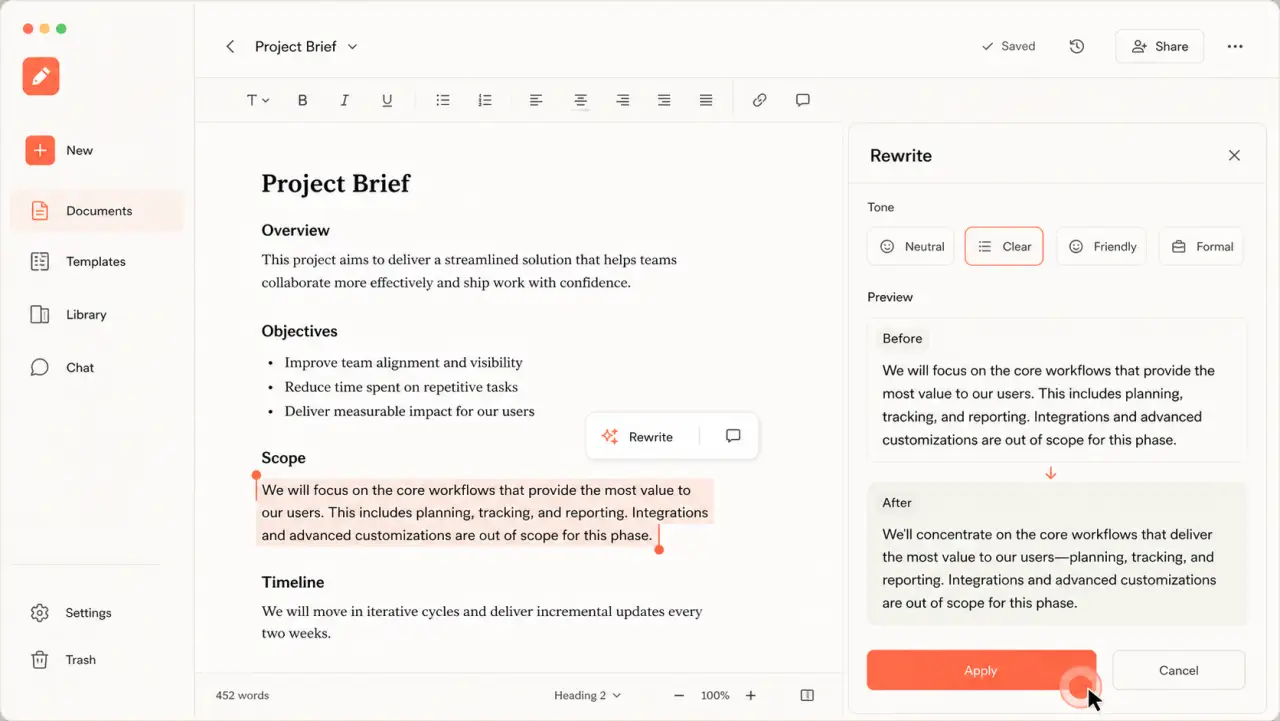
Step 1 of 3
Current step
Start with the job
Select a real passage so the viewer understands the problem before the feature appears.
Three-step walkthrough
-
Start with the job
Select a real passage so the viewer understands the problem before the feature appears.
-
Choose the rewrite
Point to the new action and explain the outcome in the language of the task.
-
Apply the result
Let the before-and-after state prove the change, then finish on the apply action.
Why it works
Keep the experience tied to one useful outcome
- 01The feature is introduced inside a job the audience already recognizes.
- 02The comparison proves the change without relying on a long launch claim.
- 03The same guided source can support a link, embed, GIF, or video distribution format.
DemoFast features used
A lightweight build, not a simulated integration
Custom highlight area
Zoom area
GIF or video export
Implementation guidance
Build the real version from approved product screens
- 01
Capture the released interface only after the intended path is stable.
- 02
Keep launch copy separate from the in-product instruction.
- 03
Export a passive version only after the interactive sequence is approved.