Examples · Sales demos
Move a CRM opportunity toward the next decision
A concise pipeline story that helps a prospect see the state of a deal, the relevant context, and the next action without a live environment.
Interactive walkthrough
Illustrative exampleUse the Previous and Next buttons, activate the hotspot, or press the left and right arrow keys to move through this three-step illustrative example.
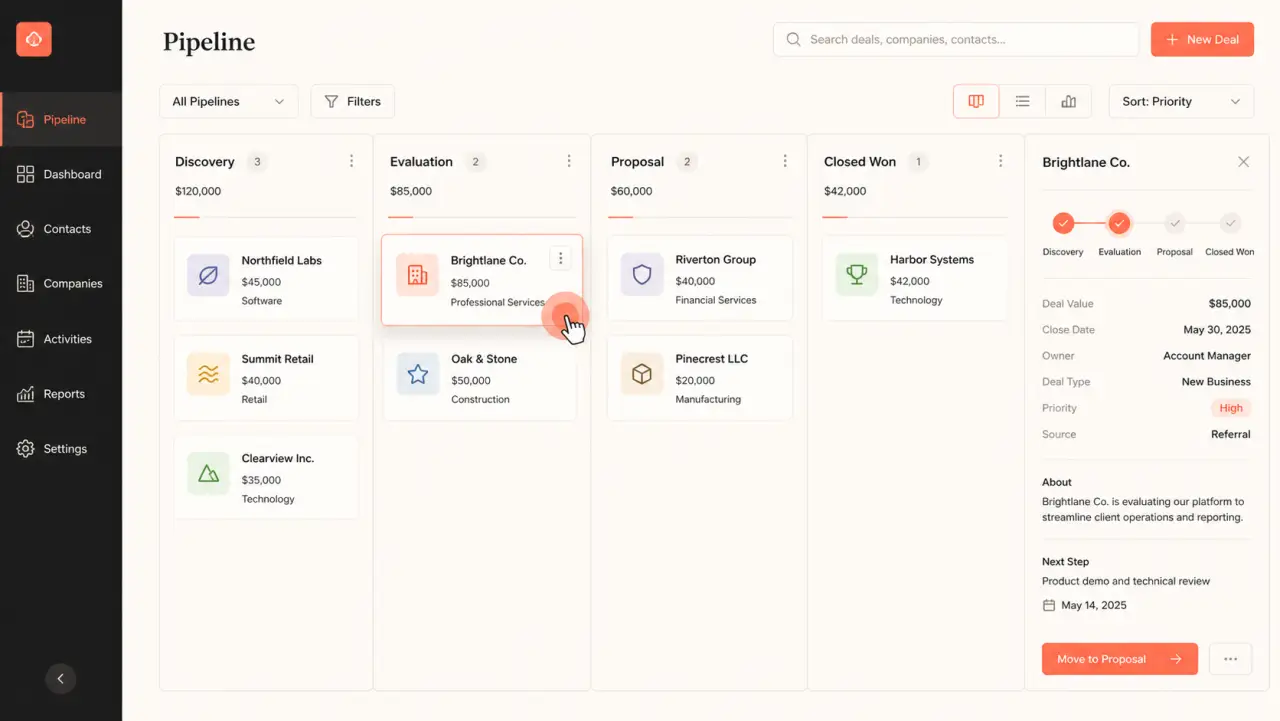
Step 1 of 3
Current step
Set the deal context
Introduce the pipeline view and the evaluation-stage opportunity the walkthrough will follow.
Three-step walkthrough
-
Set the deal context
Introduce the pipeline view and the evaluation-stage opportunity the walkthrough will follow.
-
Show the decision context
Point to the deal panel where value, owner, and next step are visible together.
-
Advance the workflow
Finish on the concrete action that moves the opportunity to the next stage.
Why it works
Keep the experience tied to one useful outcome
- 01The story follows one recognizable sales job instead of presenting a broad CRM tour.
- 02The product screen stays visible while concise guidance supplies the commercial context.
- 03A champion can replay or forward the same focused workflow after the call.
DemoFast features used
A lightweight build, not a simulated integration
Step descriptions
Public sharing
Engagement analytics
Implementation guidance
Build the real version from approved product screens
- 01
Begin with the question raised in discovery, not a generic feature list.
- 02
Use fictional or approved sample data before capturing the workflow.
- 03
End at the decision or handoff the buyer needs to understand.
Customer proof

Product walkthroughs that supported increased engagement.
FeatureShark uses DemoFast for how-to walkthroughs and sales outreach. Tanmay, Founder, reported increased engagement from that work.
Read the FeatureShark story